0 ratings








Item #:
2848807
Linux 8-in-1 Multi-Boot USB OS Collection Set for PC | Includes Ubuntu, Fedora, Tails, Kubuntu, Elementary and more for live boot or install use,
Item #:
2848807
BZD 71
Price Details
Excluding Shipping & Custom charges ( Shipping and custom charges will be calculated on checkout )
*All items will import from US
10%
In stock
 Imported from USA store
Order now and get it around Wednesday, July 29
Secured transaction
Ubuy works hard to protect your security and privacy. Our advanced payment security system ensures confidentiality by encrypting your information during transmission using AES (Advanced Encryption Standards) and SSL (Secure Socket Layer) protocols. Your payment details are 100% secure as we do not share your payment details with third party sellers.
Our Top Logistics Partners


Linux is Simply superior to an everyday OS like Windows or macOS!

Fast
Shipping

Free
Return*

Secure Packaging

100% Original Products

PCI DSS Compliance

ISO 27001 Certified


What Stands Out
MultiBoot Capability
Allows users to boot and install multiple Linux distributions from a single USB drive, enhancing convenience and flexibility for both new and experienced users.
Live Install Functionality
Enables users to try out various Linux distributions without altering their systems, providing a risk-free exploration of features and interfaces.
Portable Recovery Tool
Serves as an essential recovery tool, empowering users to troubleshoot and recover systems quickly while ensuring critical data safety during emergencies.
Product Details
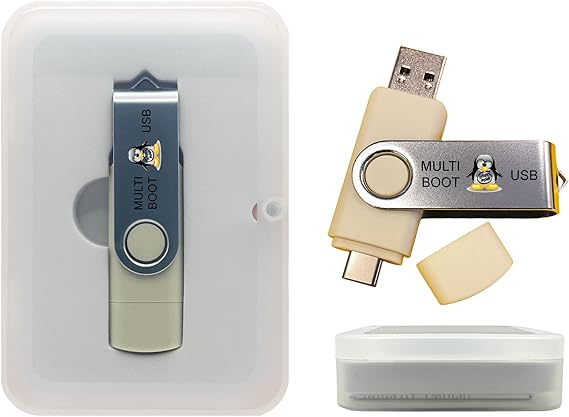
- Dual USB-A & USB-C Bootable Drive – compatible with most desktops and laptops, new or old. Boot directly or install any included Linux system permanently on your hard drive.
- Fully Customizable USB – easily Add, Replace, or Upgrade any compatible bootable ISO app, installer, or utility (clear step-by-step instructions included).
- 8 Best Linux Distributions in One Drive – explore AV Linux, Elementary OS, Fedora SoaS, Fedora Workstation, Tails OS, Ubuntu Desktop, Ubuntu MATE, and Kubuntu (KDE). No Internet Required – run Live or install offline.
- Fast, Secure & Privacy-Focused – enjoy the freedom of Linux with no forced updates, no online account requirements, and improved privacy and performance compared to Windows or macOS. Ready for Work, Learning & Entertainment – includes office suite, web browser, multimedia apps, image editing, and gaming support (Steam, Epic, GOG via Lutris or Heroic Launcher).
- Premium Hardware & Reliable Support – built with high-quality flash chips for speed and longevity. TECH STORE ON provides responsive customer support within 24 hours.
| Memory Storage Capacity | 16 GB |
| Hardware Interface | USB |
| Additional Features | Dual USB Connector, Live-boot ready, Plug-and-play, Professional grade, USB-C Compatible |
| Write Speed | 100 |
| Read Speed | 450 Megabytes Per Second |
| Connectivity Technology | USB |
| Flash Memory Type | USB Flash Drive |
| Hardware Connectivity Technology | USB Type A, USB Type C |
| Compatible Devices | Desktop, Laptop, PC, Tablet, mini PC |
| Color | Beige |
| Item Dimensions D x W x H | 2.5"D x 0.5"W x 0.5"H (6.4 x 1.3 x 1.3 cm) |
| Brand | TECH STORE ON |
| Model Name | USBBAP04 |
| Manufacturer | Tech Store On |
| UPC | 750253946524 |
| Mfr Part Number | USBBAP04 |
| Unit Count | 1.0 Count |
| Item Weight | 1 Ounces (28.35 grams) |
| Model Number | USBBAP04 |
| Special Feature | Dual USB Connector, Live-boot ready, Plug-and-play, Professional grade, USB-C Compatible |
Who Should Buy?

-
Linux Enthusiasts
Ideal for users who want multiple Linux distributions on a single USB for easy experimentation and installation.
-
IT Professionals
Useful for system administrators needing a reliable tool for system repairs and installations across various environments.
-
Students and Learners
Perfect for those studying Linux who want hands-on experience with different distributions for educational purposes.

-
Windows Users
Not suitable for users primarily focused on Windows, as it is tailored specifically for Linux operating systems.
Product Description
Have any Query? Chat with us
Customer Questions & Answers
-
Question:
What operating systems does the Linux Best OS Collection Set include?
Answer: The Linux Best OS Collection Set features a comprehensive selection of six popular Linux distributions, catering to various user preferences and needs. This typically includes Ubuntu, Fedora, Manjaro, Linux Mint, Kali Linux, and CentOS. Each OS is designed to provide unique functionality, from general-purpose use to security assessments and development environments. For example, Ubuntu is user-friendly for beginners, while Kali Linux is tailored for advanced users in cybersecurity. This versatility makes it an excellent choice for anyone looking to explore different Linux environments or for professionals requiring specific tools. -
Question:
How do I use the Linux Best OS Collection Set USB drive?
Answer: To use the Linux Best OS Collection Set USB drive, plug it into your computer and reboot your system. Generally, you will need to enter your BIOS or boot menu (usually by pressing F12, ESC, or DEL during startup) to select the USB as your boot device. Once the system boots from the USB, you can choose to try a live version of your desired OS without making any changes to your current system or proceed with a full installation. This setup is ideal for users wanting to test multiple distributions or recover data using the recovery tools provided. -
Question:
Can I use the Linux Best OS Collection Set on any computer?
Answer: Yes, the Linux Best OS Collection Set is compatible with most computers and laptops that support booting from a USB drive. Linux distributions are known for being lightweight and versatile on hardware, making them suitable for both older systems and modern machines. This is especially beneficial for users looking to revive older computers or for those wanting flexibility in their operating environments. Whether you're a developer needing a specific distribution or a casual user exploring Linux, you should find compatibility across a wide range of devices. -
Question:
Is the Linux Best OS Collection Set suitable for beginners?
Answer: Absolutely! The Linux Best OS Collection Set includes beginner-friendly distributions like Ubuntu and Linux Mint, which feature intuitive interfaces and extensive community support. These operating systems provide an easy transition for users coming from Windows or macOS. They come with a host of software pre-installed and offer straightforward installation processes. Many resources, such as forums and tutorials, are available to help newcomers get started and troubleshoot issues. This makes it an excellent choice for anyone eager to learn and explore the Linux ecosystem. -
Question:
What is meant by MultiBoot and how does it benefit users?
Answer: MultiBoot allows users to install multiple operating systems on a single USB drive, enabling them to switch between distributions as needed. The Linux Best OS Collection Set provides this functionality, making it convenient for users to test and use different Linux versions without needing separate drives. This is particularly beneficial for enthusiasts, developers, or IT professionals who need access to various environments for testing, development, or troubleshooting. With a simple boot menu, users can choose which OS to run, streamlining the process of OS exploration. -
Question:
Can I create my own bootable USB drive from the Linux Best OS Collection Set?
Answer: While the USB drive comes pre-loaded with multiple Linux distributions, you can take advantage of its existing structure to create your own bootable versions, depending on your technical expertise. Using tools like UNetbootin or Rufus, you might modify the contents or add additional distributions as needed. However, it’s recommended to follow instructions from reliable sources to avoid corrupting the device. This adaptability makes the USB drive not just a tool for exploring existing Linux systems but also a canvas for personal customization. -
Question:
What recovery options are included in the Linux Best OS Collection Set?
Answer: The Linux Best OS Collection Set includes recovery tools typically found in distributions such as SystemRescue and Boot Repair. These tools allow users to recover lost data, fix boot issues, and repair partitions. This is invaluable for users who face system crashes or accidental deletions. For instance, if a Windows system fails to boot, you can boot from the USB drive and use these utilities to diagnose and rectify the problem without losing crucial files. This makes the USB a dual-purpose tool for both exploring Linux and providing recovery capabilities. -
Question:
Does the Linux Best OS Collection Set support both 32-bit and 64-bit architectures?
Answer: Yes, the Linux Best OS Collection Set generally supports both 32-bit and 64-bit architectures, accommodating a wide range of devices. Most modern Linux distributions have transitioned to 64-bit, offering better performance and more efficient memory usage. However, options for 32-bit versions are included to ensure compatibility with older hardware. This versatility allows users to keep older systems functional while exploring modern distributions on newer machines. It’s an excellent resource for schools, businesses, or individuals with diverse computing environments. -
Question:
Where can I buy the Linux Best OS Collection Set Universal 6-in-1 MultiBoot Bootable Live Install and Recovery USB Flash Thumb Drive?
Answer: You can purchase the Linux Best OS Collection Set Universal 6-in-1 MultiBoot Bootable Live Install and Recovery USB Flash Thumb Drive at Ubuy. This platform offers a straightforward buying experience and typically provides good customer support for your queries. Ubuy provides a reliable option when you're looking for this specific collection, ensuring you receive a quality product to efficiently explore various Linux distributions on one USB drive.
TECH STORE ON USB Flash Drives USBBAP04 Editorial Review
This Universal 6-in-1 Linux Operating Systems Collection Install Recovery MultiBoot Bootable Live USB Flash Drive is a versatile tool that allows users to boot into various Linux operating systems on both PCs and Macs. However, customer experiences with the product have been mixed. Some users have successfully booted their systems using this USB drive, emphasizing the ease of use by simply holding down a key during startup. However, there are limitations to its functionality. It cannot install macOS Sierra, and some customers reported that it did not work on their older Mac computers. Additionally, while the drive can run live without the need for a physical hard drive, performance may not be optimal in this mode. For actual installation, a hard drive is required. The USB drive may not significantly improve the speed of a slow computer, as confirmed by a user with a similar setup. Furthermore, the product is not recommended for Chromebooks due to compatibility issues with the unique BIOS of these devices. It may not work on devices in which USB booting needs to be enabled in Developer Mode. In conclusion, the Universal 6-in-1 Linux Operating Systems Collection Install Recovery MultiBoot Bootable Live USB Flash Drive offers convenience for trying out different Linux distributions, but it has limitations in terms of compatibility with certain systems and performance. **
Customer Reviews & Ratings
117 customers ratings
-
5 Star
46%
-
4 Star
15%
-
3 Star
15%
-
2 Star
9%
-
1 Star
15%
Review this product
Share your thoughts with other customers
Pros
- Easy to use for booting into various Linux operating systems
- Can run live without the need for a physical hard drive
Cons
- Limited functionality on older Mac computers
Platform Trust & Buyer Confidence

MT
Mohd
Verified buyer
“The product received very good packaging & safe…Thank You”
16 June 2026 · via Trustpilot
SJ
Shawati
Verified buyer
“Accurate delivery timing given”
16 June 2026 · via Trustpilot
YB
Youcef
Verified buyer
“Not madly expensive like I thought, and much quicker than promised.”
15 June 2026 · via Trustpilot
LM
Leila
Verified buyer
“Never dealt with Ubuy before, but everything worked out great. Seamless cross border purchasing and shipping. Thanks!”
6/7/2026 · via Trustpilot
KA
Kwame
Verified buyer
“The process was smooth, with clear communication and timelines. This was my 1st purchase and I am really impressed. I will definitely be coming back.”
12 June 2026 · via Trustpilot
Secure Checkout
Global Delivery
Easy Returns
Genuine Products
Product Price History
Important information
- Limitations : For products shipped internationally, please note that any manufacturer warranty may not be valid; manufacturer service options may not be available; product manuals, instructions, and safety warnings may not be in destination country languages; the products (and accompanying materials) may not be designed in accordance with destination country standards, specifications, and labeling requirements; and the products may not conform to destination country voltage and other electrical standards (requiring use of an adapter or converter if appropriate). The recipient is responsible for assuring that the product can be lawfully imported to the destination country. When ordering from Ubuy or its affiliates, the recipient is the importer of record and must comply with all laws and regulations of the destination country.
- Not all the products listed on Ubuy are for sale, as Ubuy is a global search engine. Products are subject to export/trade regulations.
BZD 71
Order now and get it around Wednesday, July 29
This item is not restrict in my country.(Please click on above link if this item is not restrict in your country, So our team will review and allow.)
QTY:
Secured transaction
PCI DSS compliant and ISO 27001:2022 certified, with encrypted payments and full buyer protection on every order.
Our Top Logistics Partners
Fastest cross-border delivery
Features & Benefits
- Universal 6-in-1 MultiBoot USB compatible with most PCs.
- Run Live or install alongside existing operating systems.
- Includes 6 recent Linux distributions for versatility.
- No online account or forced updates required.
- Faster performance, better stability, and enhanced privacy.
- Essential tools for everyday tasks including office software and multimedia.
Ubuy Assurance
Experience worry-free shopping with 100% original products, PCI DSS-compliant payment security, ISO 27001-certified data protection, the fastest cross-border delivery, free returns *, and secure packaging on every order.