- Home Page /
- Video Games /
- Legacy Systems /
- Nintendo Systems /
- Nintendo 3DS & 2DS /
- Accessories /
- Front Outer Panel Touch Screen Digitizer Repa...
0 ratings


Item #:
55064537
Front Outer Panel Touch Screen Digitizer Repair Replacement Glass Lens (NO LCD Screen) with Y-Tool for Nintendo New 3DS XL LL Console 2015 (NOT for
Item #:
55064537
BZD 36
Price Details
Excluding Shipping & Custom charges ( Shipping and custom charges will be calculated on checkout )
*All items will import from US
0 ratings
Write a review
In stock
 Imported from USA store
QTY:
Only 3 items left in stock.
Order now and get it around Wednesday, June 24
Secured transaction
Ubuy works hard to protect your security and privacy. Our advanced payment security system ensures confidentiality by encrypting your information during transmission using AES (Advanced Encryption Standards) and SSL (Secure Socket Layer) protocols. Your payment details are 100% secure as we do not share your payment details with third party sellers.
Our Top Logistics Partners


Each one will be 100% tested and working before packing and shipping.

Fast
Shipping

Free
Return*

Secure Packaging

100% Original Products

PCI DSS Compliance

ISO 27001 Certified


What Stands Out
High-Quality Replacement
Premium touch screen digitizer ensures optimal performance and responsiveness of the Nintendo New 3DS XL LL. Enhances user experience by restoring clarity and touch sensitivity.
Complete Kit Included
Comes with a Y-Tool for easy installation, making the repair process straightforward for users. Saves time and effort while ensuring precision during the replacement.
Custom Fit
Specifically designed for Nintendo New 3DS XL LL 2015, this lens guarantees a perfect fit and seamless integration. Avoids common issues faced with generic replacements, enhancing durability and functionality.
Product Details
- Brand New Front Outer Panel Touch Screen Digitizer Repair Replacement Plastic Glass ( NO LCD Screen ) with Y-tool for New 3DS XL LL Console 2015 ( NOT for 3DS XL LL )
- Each One Will Be 100% Tested and Working Before Packing and Shipping
- Please Double Check the Model Number of Your Device and Install These Parts under Professional Guide
- Please Install it Very Professionally, if Not, Please Do Not Try
- No Man-Made Damage or Scratch When Returning
| Package Dimensions | 6.34 x 4.37 x 0.63 inches (16.1 x 11.1 x 1.6 cm) |
| Item Weight | 1.44 ounces (40.82 grams) |
| Manufacturer | Ivos Tech |
| Is Discontinued By Manufacturer | No |
| Batteries required | No |
Who Should Buy?

-
DIY Gamers
Gamers who enjoy repairing their devices can easily replace the screen using this replacement part and included tools.
-
Cost-Conscious Owners
Users looking to save money on repairs without purchasing a new console will benefit from this affordable replacement.
-
Repair Technicians
Professional or hobbyist repair technicians looking for a reliable replacement part for the New 3DS XL can use this product.

-
Non-Technical Users
Individuals without repair experience may struggle to install this touch screen digitizer effectively, risking further damage.
-
3DS XL Owners
This product is specifically for the New 3DS XL LL and will not fit standard 3DS XL models or other variations.
-
Lack of Assembly Skills
Users who lack basic assembly or technical skills may find this repair difficult and potentially frustrating to accomplish.
Product Description
Have any Query? Chat with us
Customer Questions & Answers
-
Question:
What is included in the Front Outer Panel Touch Screen Digitizer Repair Replacement package?
Answer: The package includes a high-quality touch screen digitizer designed specifically for the Nintendo New 3DS XL LL console, along with the necessary Y-tool for easy installation. The digitizer is essential for restoring your device's touch functionality without needing to replace the entire LCD screen. This replacement is perfect for addressing issues like unresponsive touch or cracked outer glass. Whether you’re repairing your own console or preparing a unit for resale, this kit ensures you have all the components needed to achieve a professional-grade repair. -
Question:
Is this touch screen replacement compatible with other models of Nintendo consoles?
Answer: No, this touch screen digitizer is specifically designed for the Nintendo New 3DS XL LL console from 2015 and is not compatible with the original 3DS model or any other variant. It is crucial to ensure compatibility to avoid further damage or improper fit. If you own the New 3DS XL or LL, this replacement is an ideal solution to restore the device’s functionality, especially after accidental damage. Carefully check your model before purchase to ensure a perfect fit. -
Question:
Can I install this touch screen digitizer myself?
Answer: Yes, you can install the touch screen digitizer yourself, especially with the included Y-tool that simplifies the opening process of your console. There are many online guides and video tutorials available that walk you through the installation steps. Having a DIY approach not only saves repair costs but also gives you the satisfaction of reviving your device on your own. Just make sure to follow instructions carefully to avoid damaging other components during the repair. -
Question:
How can I tell if my touch screen needs replacement?
Answer: You should consider replacing your touch screen if you notice persistent issues such as unresponsiveness, cracks, or distortions on the display. These symptoms indicate that the digitizer has been compromised. Additionally, if your screen flickers or produces odd colors, it may be time for a replacement. Knowing the signs enables you to address these problems promptly, ensuring that your gaming experience remains enjoyable without interruptions caused by faulty hardware. -
Question:
What types of tools are needed for the installation of this digitizer?
Answer: Apart from the included Y-tool, you may also require a small Phillips screwdriver, a plastic opening tool, and tweezers for a successful installation. These tools help in carefully removing the outer panel without damaging the internal components of your console. Ensuring you have the right tools not only simplifies the process but also minimizes the risk of damage during the repair. Preparing all tools beforehand makes for a smoother installation experience. -
Question:
Can I use this digitizer if my LCD screen is damaged?
Answer: This replacement digitizer is designed to work with the existing LCD screen. However, if the LCD screen itself is damaged, installing a new digitizer alone won’t restore full functionality. It's pivotal to assess the condition of both components before making a purchase. If your LCD is functioning properly, replacing just the digitizer will effectively restore touch capabilities, but in the case of LCD issues, further repairs may be necessary to achieve optimal performance. -
Question:
What is the main benefit of replacing the touch screen instead of buying a new console?
Answer: Replacing the touch screen digitizer is a cost-effective solution compared to purchasing a new Nintendo New 3DS XL LL console. It allows you to extend the life of your device while maintaining its unique features and games that you enjoy. Additionally, a successful repair can rejuvenate your gaming experience, making it feel like a brand-new device without the expense of a new console. This option is especially advantageous for gamers who have a genuine attachment to their device. -
Question:
What should I do if the replacement touch screen does not function properly after installation?
Answer: If the newly installed digitizer does not function as expected, check the installation to ensure all connections are secure and properly seated. It's common for slight misalignments to cause operational issues. Additionally, ensure you are using the correct model of digitizer with your device. If problems persist, you may need to review the compatibility or consider consulting professional repair services to prevent further complications. -
Question:
Where can I buy the Front Outer Panel Touch Screen Digitizer Repair Replacement Glass Lens?
Answer: You can purchase the Front Outer Panel Touch Screen Digitizer Repair Replacement Glass Lens for your Nintendo New 3DS XL LL console on Ubuy in Belize. Ubuy offers a variety of electronic replacement parts including this digitizer, ensuring you get the right product tailored for your device. The site is user-friendly and provides ample details to help make your purchasing decision easier, so you can quickly find what you need to restore your gaming device.
lenboes Accessories Editorial Review


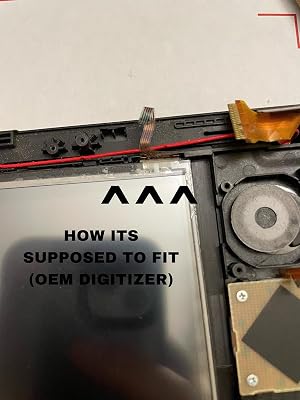

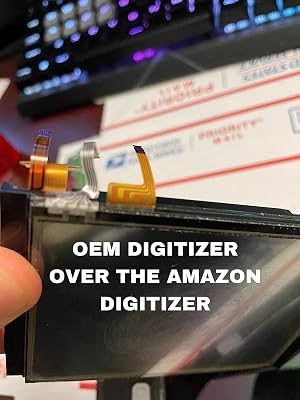

The Front Outer Panel Touch Screen Digitizer Repair Replacement Glass Lens for the Nintendo New 3DS XL has received a mixed reception from customers. While some users have celebrated its functionality and fit, others have voiced significant concerns about quality control and performance. Users who successfully installed the digitizer generally reported that it works well once in place, complimenting the ease of installation despite the need for additional adhesive to secure it in the shell of the device. However, several reviews highlighted frustrations with receiving defective products or components that do not match the original design specification, such as misaligned ribbon cables that prevent proper installation. The texture of the digitizer also drew criticism; many users noted that it feels rougher than the original touch screen, leading to inConsistent stylus tracking and requiring more pressure to register touches. This has resulted in an experience that some described as a downgrade from the OEM part, with suggestions that users with lightly scratched screens might be better off preserving their original digitizers. Another recurring theme was the challenges related to sourcing the correct part, with customers expressing disappointment at having to deal with returns or replacements due to receiving the incorrect item initially. This casts doubt on the reliability of the seller's inventory management. Overall, while the product can serve as a solution for those in need of a digitizer, potential buyers should approach with caution, especially if they are not comfortable with DIY repairs or if they are looking for a direct equivalent to the original part. **
Customer Reviews & Ratings
58 customers ratings
-
5 Star
57%
-
4 Star
14%
-
3 Star
10%
-
2 Star
8%
-
1 Star
11%
Review this product
Share your thoughts with other customers
Pros
- Functionality is satisfactory for those who received non-defective units.
- Installation is straightforward for those experienced with electronics.
- Good fit with the original device once correctly installed.
Cons
- Rough texture and inConsistent performance compared to the original touch panel.
Product Price History
Important information
- Limitations : For products shipped internationally, please note that any manufacturer warranty may not be valid; manufacturer service options may not be available; product manuals, instructions, and safety warnings may not be in destination country languages; the products (and accompanying materials) may not be designed in accordance with destination country standards, specifications, and labeling requirements; and the products may not conform to destination country voltage and other electrical standards (requiring use of an adapter or converter if appropriate). The recipient is responsible for assuring that the product can be lawfully imported to the destination country. When ordering from Ubuy or its affiliates, the recipient is the importer of record and must comply with all laws and regulations of the destination country.
- Not all the products listed on Ubuy are for sale, as Ubuy is a global search engine. Products are subject to export/trade regulations.
BZD 36
Order now and get it around Wednesday, June 24
This item is not restrict in my country.(Please click on above link if this item is not restrict in your country, So our team will review and allow.)
QTY:
Only 3 items left in stock.
Secured transaction
Ubuy works hard to protect your security and privacy. Our advanced payment security system ensures confidentiality by encrypting your information during transmission using AES (Advanced Encryption Standards) and SSL (Secure Socket Layer) protocols. Your payment details are 100% secure as we do not share your payment details with third party sellers.
Our Top Logistics Partners
Fastest cross-border delivery
Features & Benefits
- Brand new touch screen digitizer replacement for Nintendo New 3DS XL LL.
- Includes a Y-tool for easy installation.
- 100% tested for functionality before shipping.
- Compatible with 2015 model only; not for 3DS XL LL.
- Professional installation is recommended to avoid damage.
- Return policy excludes man-made damage or scratches.