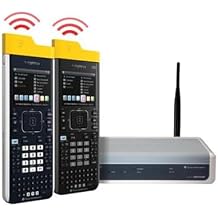




0 ratings
Texas Instruments Nspire CX NAVN3/CRK30/2L1 Navigator 30-User Software
Create a powerful learning environment with TI-Nspire CX and TI-Nspire CX CAS handhelds.
Texas Instruments Nspire CX NAVN3/CRK30/2L1 Navigator 30-User Software
Item #: 20201416

Texas Instruments Nspire CX NAVN3/CRK30/2L1 Navigator 30-User Software

Item #: 20201416
0 ratings Write a review
Out of stock
us Imported from USA store
Our Top Logistics Partners
  • fedex
  • dhl
Create a powerful learning environment with TI-Nspire CX and TI-Nspire CX CAS handhelds.
U-Care Warranty:
None
Select a Plan
fast shipping

Fast
Shipping

free return

Free
Return*

secure packaging

Secure Packaging

100% original products

100% Original Products

pci-dss

PCI DSS Compliance

iso certified

ISO 27001 Certified


paypal payment
visa payment
mastercard payment

What Stands Out

Collaborative Learning
Supports up to 30 users simultaneously, allowing for real-time collaboration and enhanced learning experiences in classrooms, fostering teamwork and interactive problem-solving.
Powerful Graphing
Offers advanced graphing capabilities, making it ideal for high-level math and science courses, thus significantly improving students' understanding of complex concepts.
User-Friendly Interface
Designed with an intuitive interface that simplifies navigation, enabling students of all skill levels to easily access tools and resources, enhancing overall usability and engagement.

Product Details

Get the TI-Nspire CX Navigator System with software for a powerful learning environment. Connect with handhelds, create lessons, track progress on PC and Mac. Shop at Ubuy Belize
  • Create a powerful learning environment with TI-Nspire CX and TI-Nspire CX CAS handhelds
  • Wireless Network Adapters make this system compact and portable
  • New TI-Nspire Navigator Teacher Software with five workspaces to access content, create lessons, and track student progress
  • Compatible with both PC and Mac
  • Gain flexibility to connect with all TI-Nspire and TI-Nspire CAS handhelds using TI-Nspire Navigator Wireless Cradles
  • Includes a convenient TI-Nspire Cradle Charging Bay
Calculator TypeGraphing
Power SourceBattery Powered
Screen Size1
Number of Batteries1 Product Specific batteries required.
Compatible DevicesDesktop
Display TypeLCD
ColorMulticolor
Enclosure MaterialPlastic
Item Dimensions L x W16"L x 12"W (40.6 cm)
BrandTexas Instruments
Model NameNAVN3-CRK30-2L1
UPC033317203857
Global Trade Identification Number00033317203857
ManufacturerTexas Instruments
Mfr Part NumberNAVN3/CRK30/2L1
Model NumberNAVN3/CRK30/2L1
Unit Count1.0 Count

Who Should Buy?

Suitable For
  • Classroom Settings

    Ideal for teachers managing lessons and assessments for up to 30 students simultaneously using enhanced interactive features.

  • STEM Education

    Perfect for students and educators engaged in science, technology, engineering, and mathematics education, enhancing collaborative learning.

  • Advanced Learners

    Beneficial for advanced users needing complex calculations and graphing capabilities, suitable for higher education environments.

Not Suitable For
  • Individual Users

    Not suitable for single use as the software is designed for group settings with multiple users.

Product Description

Texas Instruments Nspire CX NAVN3/CRK30/2L1 Navigator 30-User Software

Have any Query? Chat with us

Customer Questions & Answers

  • Question: What features does the Texas Instruments Nspire CX NAVN3CRK302L1 Navigator software offer?

    Answer: The Texas Instruments Nspire CX Navigator software supports classroom management and enhances collaborative learning experiences. It allows teachers to interact with student devices in real time, share screens, and streamline lesson delivery. This interactivity is pivotal in fostering a dynamic learning environment, where teachers can see students' progress and provide immediate feedback. Educators can also distribute files directly to students, making it easier to manage assignments and facilitate group activities.
  • Question: Is the Texas Instruments Nspire Navigator software compatible with all TI-Nspire models?

    Answer: The Nspire CX Navigator software is primarily designed for use with the TI-Nspire CX series calculators. However, it also offers limited compatibility with other models within the TI-Nspire ecosystem. To achieve optimal performance and features, using it with TI-Nspire CX devices is recommended. This ensures access to specialized functionalities, making classroom technology integration seamless and enhancing the learning experience. Schools should confirm device compatibility before implementation.
  • Question: How can the Nspire CX Navigator software improve classroom collaboration?

    Answer: The Nspire CX Navigator software enhances collaboration by allowing teachers to share information and resources with multiple students simultaneously. Features like screen sharing and real-time monitoring empower educators to provide immediate guidance. Additionally, students can work together on problem-solving tasks or interactive activities, promoting teamwork and idea exchange. This capability is invaluable in promoting collaborative learning, where students can benefit from peer support while engaging with the material actively.
  • Question: Can the software be used for remote learning environments?

    Answer: Yes, the Nspire CX Navigator software is an effective tool for remote learning. Its capabilities allow teachers to connect with students regardless of their location, facilitating a virtual classroom atmosphere. Through screen sharing and real-time assistance, educators can maintain engagement, even from a distance. This is particularly beneficial as educational institutions embrace hybrid learning models, ensuring that students remain connected and informed, regardless of whether they are learning in-person or online.
  • Question: What type of training is available for using Nspire CX Navigator?

    Answer: Texas Instruments offers various training resources for educators to effectively use the Nspire CX Navigator software. These resources include webinars, online tutorials, and user manuals that cover the software’s functionalities. Such training ensures that teachers can leverage the tool to its fullest, enhancing their teaching strategies. Schools and institutions can also organize specific training sessions for staff, empowering them to integrate technology into their lessons seamlessly and improve student engagement.
  • Question: What subjects can benefit from using the Nspire CX Navigator software?

    Answer: The Nspire CX Navigator software is particularly beneficial for subjects like mathematics and science, where interactive visualization and data analysis are crucial. However, it can also assist with a range of other subjects, including engineering and technology. The software’s ability to illustrate complex concepts through graphic representations and simulations allows teachers to create a richer learning environment. This dynamic learning tool encourages exploration and comprehension across multiple disciplines.
  • Question: Is there a limit on the number of devices that can connect to the Nspire CX Navigator?

    Answer: The Nspire CX Navigator software supports up to 30 user devices concurrently, which is ideal for most classroom settings and group activities. This limitation ensures that each student's progress can be actively monitored and supported by the teacher. In larger educational environments, it enables effective classroom management and personalized instruction. This connectivity fosters an inclusive atmosphere, allowing for real-time interactions and support across all students.
  • Question: How does Nspire CX Navigator support differentiated instruction?

    Answer: Nspire CX Navigator facilitates differentiated instruction by allowing teachers to tailor tasks based on students' unique learning needs. Through its real-time monitoring features, educators can identify who is struggling and provide immediate assistance. Additionally, the software enables teachers to assign different tasks to various groups, promoting personalized learning paths within the same classroom. By adapting instructional strategies in real-time, educators can effectively meet diverse learners' needs and enhance overall student success.
  • Question: What are the installation requirements for Nspire CX Navigator software?

    Answer: The installation of Nspire CX Navigator software requires compatible operating systems such as Windows or macOS along with the necessary hardware specifications. The software typically needs to be installed on a teacher's computer which will interface with the students’ devices. Texas Instruments provides detailed installation instructions and system requirements to facilitate a smooth setup process. Ensuring proper installation allows teachers to maximize the software’s functionalities effectively in their classrooms.
  • Question: Where can I buy Texas Instruments Nspire CX NAVN3CRK302L1 Navigator 30-User Software?

    Answer: You can purchase the Texas Instruments Nspire CX NAVN3CRK302L1 Navigator 30-User Software from Ubuy in Belize. Ubuy offers a user-friendly online shopping experience, providing customers with the latest technology at their convenience. With a simple search on their platform, educators can find the necessary software and often benefit from various promotions or deals.

TexasInstruments Graphing NAVN3/CRK30/2L1 Editorial Review

No editorial reviews found

Customer Reviews & Ratings

1 customers ratings
  • 5 Star
    100%
  • 4 Star
    0%
  • 3 Star
    0%
  • 2 Star
    0%
  • 1 Star
    0%

Review this product

Share your thoughts with other customers

Pros

  • User-friendly interface
  • Supports 30 users simultaneously
  • Robust graphing capabilities
  • Extensive educational resources
  • Ideal for collaborative learning

Cons

  • Occasional software updates required

Platform Trust & Buyer Confidence

trustpilot logo
4.2/5 9300 + reviews
Read reviews
JG
Jazz
Verified buyer

“Easy to use and always helpful and sorts any issues I've had past and present”

1 September 2026 · via Trustpilot
EK
Emmanuel
Verified buyer

“I always receive support when I engage customer service. Overall my experience with UBUY has been top notch. Keep up the good work.”

31 August 2026 · via Trustpilot
F
fnd
Verified buyer

“The delivery was fast and the product came undamaged and authentic.”

29 August 2026 · via Trustpilot
LC
Leana
Verified buyer

“Ubuy is extremely efficient and to order online is an easy process. The verity of products to buy is really unlimited! My order was urgent and I got it on time. The products are great! Thank you Ubuy!”

25 August 2026 · via Trustpilot
HL
Hengo
Verified buyer

“Fast, convenient and cheap. Great store!”

27 August 2026 · via Trustpilot
Secure Checkout Global Delivery Easy Returns Genuine Products

Important information

  • Limitations : For products shipped internationally, please note that any manufacturer warranty may not be valid; manufacturer service options may not be available; product manuals, instructions, and safety warnings may not be in destination country languages; the products (and accompanying materials) may not be designed in accordance with destination country standards, specifications, and labeling requirements; and the products may not conform to destination country voltage and other electrical standards (requiring use of an adapter or converter if appropriate). The recipient is responsible for assuring that the product can be lawfully imported to the destination country. When ordering from Ubuy or its affiliates, the recipient is the importer of record and must comply with all laws and regulations of the destination country.
  • Not all the products listed on Ubuy are for sale, as Ubuy is a global search engine. Products are subject to export/trade regulations.