- Home Page /
- Electronics /
- Computer Accessories /
- Computer Components /
- Single Board Computers /
- waveshare 11.9inch Capacitive Touch Display C...
0 ratings

Item #:
71601497
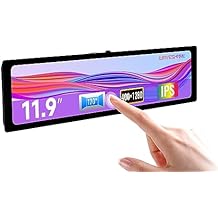
waveshare 11.9inch Capacitive Touch Display Compatible with Raspberry Pi 5/4B/3B/Zero/Zero W/Zero 2W/Pico/Pico W/Pico WH, 3201480 Resolution IPS DSI
Item #:
71601497
BZD 336
Price Details
Excluding Shipping & Custom charges ( Shipping and custom charges will be calculated on checkout )
*All items will import from US
0 ratings
Write a review
In stock
 Imported from USA store
QTY:
Order now and get it around Monday, July 20
Secured transaction
Ubuy works hard to protect your security and privacy. Our advanced payment security system ensures confidentiality by encrypting your information during transmission using AES (Advanced Encryption Standards) and SSL (Secure Socket Layer) protocols. Your payment details are 100% secure as we do not share your payment details with third party sellers.
Our Top Logistics Partners


11.9inch IPS display with capacitive touch panel, hardware resolution is 320x1480.

Fast
Shipping

Free
Return*

Secure Packaging

100% Original Products

PCI DSS Compliance

ISO 27001 Certified


What Stands Out
High Resolution
With a stunning 320×1480 resolution, this display provides clear and vivid visuals, enhancing your projects with detailed graphics and text, making it ideal for both hobbyists and professionals.
Capacitive Touch
The capacitive touch technology allows for smooth and responsive interactions, providing an intuitive user experience that enhances usability in applications, from simple tasks to complex interfaces.
Broad Compatibility
Designed to work with multiple Raspberry Pi models, including the latest ones, ensuring versatility across various projects, making it a perfect choice for developers and makers alike.
Product Details
| Country of Origin | This item will be imported from US |
| Item Weight | 2.2 lbs (1 kg) |
| What is in the box | waveshare 11.9inch Capacitive... For more details, please check description/product details |
Who Should Buy?

-
Embedded Projects
Ideal for developers creating interactive devices or kiosks using Raspberry Pi for user-friendly interfaces.
-
DIY Raspberry Pi
Perfect for hobbyists looking to build custom displays for Raspberry Pi projects, ensuring smooth touch interaction.
-
Educational Purposes
Great for classrooms or workshops where students learn programming and design with Raspberry Pi hardware.

-
High-Resolution Needs
Not suitable for users requiring higher resolutions or demanding graphical applications beyond its 320x1480 specification.
-
Professional Use
May not meet quality standards required for professional-grade applications in design or industrial environments.
-
Casual Users
Less ideal for casual users who do not need advanced features and should consider simpler display solutions.
Product Description
waveshare 11.9inch Capacitive Touch Display Compatible with Raspberry Pi 5/4B/3B/Zero/Zero W/Zero 2W/Pico/Pico W/Pico WH, 3201480 Resolution IPS DSI Interface
Have any Query? Chat with us
Customer Questions & Answers
-
Question:
What devices are compatible with the Waveshare 11.9inch Capacitive Touch Display?
Answer: The Waveshare 11.9inch Capacitive Touch Display is compatible with a wide range of Raspberry Pi models, including Raspberry Pi 5, 4B, 3B, Zero, Zero W, Zero 2W, Pico, Pico W, and Pico WH. This compatibility allows users to enhance their projects with a high-resolution display, making it suitable for various applications such as home automation, interactive media displays, or DIY electronics projects. The IPS technology ensures vibrant colors and wide viewing angles, improving user experience significantly. -
Question:
What is the resolution of the Waveshare 11.9inch Capacitive Touch Display?
Answer: This display features an impressive resolution of 320 x 1480 pixels. This high pixel density ensures that images and text are sharp and clear, making it perfect for applications where detail is crucial. Whether you are developing a user interface for your Raspberry Pi project or using it for digital signage, the enhanced resolution elevates the visual quality, providing an engaging experience for users or viewers. -
Question:
Is the touch functionality on the display responsive?
Answer: Yes, the capacitive touch functionality of the Waveshare 11.9inch display is highly responsive. Capacitive touchscreens are known for their precision and sensitivity compared to resistive screens. Users can enjoy smooth interactions, making it ideal for applications that require user input, such as gaming, programming, or interactive learning projects. This allows for a more engaging experience, especially in applications requiring real-time interactions. -
Question:
Can I use the display for a digital signage solution?
Answer: Absolutely! The Waveshare 11.9inch Capacitive Touch Display is excellent for digital signage solutions due to its high resolution and capacitive touch capabilities. You can use it to showcase promotional content, interactive menus, or information displays in retail environments. The vibrant IPS display ensures that your content stands out and attracts attention, making it a perfect choice for businesses looking to enhance their visibility. -
Question:
How do I connect the Waveshare display to my Raspberry Pi?
Answer: Connecting the Waveshare 11.9inch Capacitive Touch Display to your Raspberry Pi is straightforward. You need to use the DSI interface available on the Raspberry Pi board. Simply align the connector of the display with the DSI port and secure it properly. Once connected, you can power on your Raspberry Pi and follow the installation guide to configure the display settings. This process allows you to quickly set up the display for your project in no time. -
Question:
What are possible applications for this display?
Answer: The Waveshare 11.9inch Capacitive Touch Display can be used in various applications, including interactive kiosks, educational tools, or media center projects. The combination of responsive touch and high-resolution display makes it suitable for creating user-friendly applications like smart home dashboards, control panels, or even portable gaming devices. The versatility of usage ensures that it can meet both hobbyist and professional requirements. -
Question:
Does the IPS panel provide good viewing angles?
Answer: Yes, the IPS technology used in the Waveshare 11.9inch display offers excellent viewing angles, typically up to 178 degrees. This feature allows multiple viewers to enjoy a clear picture without color distortion from different angles. It’s particularly beneficial in collaborative environments, exhibition setups, or presentations where clarity and visibility are essential. The wide viewing angles enhance the overall user experience significantly. -
Question:
How do I install drivers for the Waveshare touch display?
Answer: To install drivers for the Waveshare 11.9inch Capacitive Touch Display, you typically need to download the appropriate driver files from the Waveshare website. After downloading, you can transfer the files to your Raspberry Pi and follow the installation instructions provided in the documentation. Proper installation of drivers is crucial for optimal touchscreen performance, ensuring that all touch functionalities work seamlessly during project implementation. -
Question:
What is the aspect ratio of the Waveshare 11.9inch display?
Answer: The Waveshare 11.9inch Capacitive Touch Display features an aspect ratio of approximately 16:9, which is commonly used for wide video displays. This aspect ratio is ideal for multimedia applications, ensuring that videos and images are displayed without distortion. It’s perfect for projects like media players or interactive presentations, providing a more immersive viewing experience for users. -
Question:
Where can I buy the Waveshare 11.9inch Capacitive Touch Display in Belize?
Answer: You can purchase the Waveshare 11.9inch Capacitive Touch Display from Ubuy, a reliable platform offering a wide range of tech products. Ubuy provides convenient access to this display in Belize, making it easy for you to obtain this high-quality accessory to enhance your Raspberry Pi projects. With Ubuy, you can expect a user-friendly shopping experience along with detailed product information.
waveshare Single Board Computers Editorial Review
No editorial reviews found
Customer Reviews & Ratings
1 customers ratings
-
5 Star
0%
-
4 Star
100%
-
3 Star
0%
-
2 Star
0%
-
1 Star
0%
Review this product
Share your thoughts with other customers
Pros
- High resolution 320×1480 IPS display
- Responsive capacitive touch functionality
- Compatible with multiple Raspberry Pi models
- Compact and lightweight design
- Vibrant color reproduction
Cons
- Limited built-in software features
Product Price History
Important information
- Limitations : For products shipped internationally, please note that any manufacturer warranty may not be valid; manufacturer service options may not be available; product manuals, instructions, and safety warnings may not be in destination country languages; the products (and accompanying materials) may not be designed in accordance with destination country standards, specifications, and labeling requirements; and the products may not conform to destination country voltage and other electrical standards (requiring use of an adapter or converter if appropriate). The recipient is responsible for assuring that the product can be lawfully imported to the destination country. When ordering from Ubuy or its affiliates, the recipient is the importer of record and must comply with all laws and regulations of the destination country.
- Not all the products listed on Ubuy are for sale, as Ubuy is a global search engine. Products are subject to export/trade regulations.
BZD 336
Order now and get it around Monday, July 20
This item is not restrict in my country.(Please click on above link if this item is not restrict in your country, So our team will review and allow.)
QTY:
Secured transaction
Ubuy works hard to protect your security and privacy. Our advanced payment security system ensures confidentiality by encrypting your information during transmission using AES (Advanced Encryption Standards) and SSL (Secure Socket Layer) protocols. Your payment details are 100% secure as we do not share your payment details with third party sellers.
Our Top Logistics Partners
Fastest cross-border delivery
Features & Benefits
- Capacitive touch display compatible with Raspberry Pi 4B/3B+/3A+/CM3/3+/4.
- 320×1480 resolution IPS display with DSI interface.
- Supports up to 5-point touch & brightness is adjustable by software.
- Online user manual provided.
- Portrait orientation can be changed to landscape.
- Toughened glass capacitive touch panel with 6H hardness.