0 ratings






Item #:
96008101
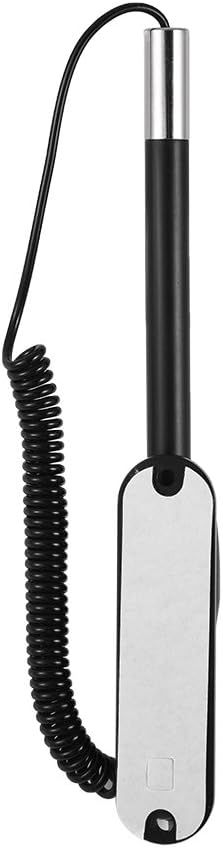
Tyenaza Stylus Pen, Resistance Capacitive Touch Screen Spring Stylus with Dock for Car Navigation, Compatible with Most Devices Equipped with A
Item #:
96008101
BZD 34
Price Details
Excluding Shipping & Custom charges ( Shipping and custom charges will be calculated on checkout )
*All items will import from US
0 ratings
Write a review
In stock
 Imported from USA store
QTY:
Only 13 items left in stock.
Order now and get it around Saturday, August 22
Secured transaction
Ubuy works hard to protect your security and privacy. Our advanced payment security system ensures confidentiality by encrypting your information during transmission using AES (Advanced Encryption Standards) and SSL (Secure Socket Layer) protocols. Your payment details are 100% secure as we do not share your payment details with third party sellers.
Our Top Logistics Partners


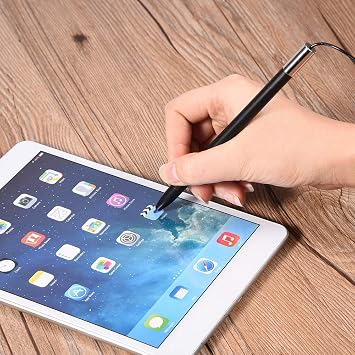
High sensitivity, you can type, click, drag, scroll, and write easily and precisely on the screen, as if using a real pen.

Fast
Shipping

Free
Return*

Secure Packaging

100% Original Products

PCI DSS Compliance

ISO 27001 Certified


What Stands Out
Enhanced Precision
The Stylus Pen offers exceptional accuracy for precise navigation on capacitive touch screens, making it ideal for car displays, tablets, and smartphones.
Ergonomic Design
Designed for comfort, the spring mechanism promotes a natural grip, reducing hand fatigue during extended use, perfect for drivers navigating complex touch interfaces.
Versatile Compatibility
Compatible with most capacitive touch devices, this stylus pen serves multiple uses, from car navigation systems to smartphones, making it an essential tool for tech-savvy users.
Product Details
- RESISTIVE HARD-TIP PEN -- High sensitivity, you can type, click, drag, scroll, and write easily and precisely on the screen, as if using a real pen
- EASY TO WORK AND CARRY-- Slim and exquisite design, stable plastic dock, and high strength spring wire for easy installation, keep the pen in place and never fall off
- WIDELY COMPATIBLE -- Compatible with most devices equipped with a resistance touch screen, such as for car navigation, POS, order machine, tax printer, various terminal, and more
- SOFT TOUCHING HEAD-- This stylus is the perfect tool for writing on the screen, protecting your screen from scratches and fingerprints
- BRINGS MORE CONVENIENCE -- Resistive design brings more. Suitable for resistive mobile phones, resistive tablets, MP4, MP5, writing boards, navigators, and other resistive screen devices
| Color | Black |
| Brand | Tyenaza |
| Material | Plastic |
| Item Weight | 0.02 Kilograms |
| Compatible Devices | Smartphone |
| Are Batteries Included | No |
| Batteries Required? | No |
| Number of Packs | 1 |
| Minimum Required Operating System Version | Android 13.0, iOS 16 |
| Unit Count | 1.0 Count |
Who Should Buy?

-
Car Navigation Users
Ideal for drivers needing precise control while using capacitive touch screen navigation systems without distractions.
-
Touch Screen Enthusiasts
Perfect for users who frequently interact with touch screens and require enhanced accuracy and comfort.
-
Artistic Freelancers
Great for artists or designers who use capacitive devices for sketches and digital artwork, providing a better drawing experience.

-
Heavy Gaming Users
May not perform well for rapid touch input and quick gestures required in gaming applications.
Product Description
Have any Query? Chat with us
Customer Questions & Answers
-
Question:
What devices are compatible with the Stylus Pen?
Answer: The Stylus Pen is compatible with most devices equipped with a capacitive touch screen. This includes a wide range of smartphones, tablets, and car navigation systems. Capacitive screens, found in devices like iPads, Android tablets, and many touchscreen monitors, detect touch through the electrical properties of the human body. Therefore, using the stylus allows for a more precise interaction, especially beneficial for drawing, note-taking, or navigating intricate interfaces. -
Question:
How does the spring feature enhance the performance of the Stylus Pen?
Answer: The spring feature of the Stylus Pen provides a unique touch responsiveness that improves accuracy and flexibility during use. It allows the tip to adapt slightly to the pressure applied, making it suitable for both casual navigation and detailed artwork. This design ensures less likelihood of slipping and helps maintain control when tapping, drawing, or scrolling, especially when used in fast-paced scenarios or while navigating a car's display. -
Question:
Is the Stylus Pen suitable for drawing and artistic purposes?
Answer: Yes, the Stylus Pen is excellent for drawing and artistic applications due to its sensitivity and precision. The capacitive tip allows artists to create detailed drawings or sketches with ease across various graphic design and drawing applications. Whether you’re sketching on an iPad, designing graphics on a touchscreen laptop, or creating art during a road trip on a touchscreen device, this stylus enhances the creative process. -
Question:
Can the Stylus Pen be used while wearing gloves?
Answer: The Stylus Pen is designed to work seamlessly without the need for direct skin contact, making it usable with gloves. However, effectiveness may vary depending on the thickness and material of the gloves. Gloved users can still navigate screens comfortably, making it perfect for those outdoors or in cold conditions while still keeping their devices accessible and fully functional. -
Question:
What is the advantage of having a dock for the Stylus Pen?
Answer: The included dock for the Stylus Pen offers a convenient storage solution, minimizing the chances of misplacing the pen. This ensures that your stylus is always within reach and charges or remains secure when not in use. It’s particularly advantageous for drivers who can store it in their car for easy access when guided by their device's navigation system. -
Question:
How do you clean the tip of the Stylus Pen?
Answer: To clean the tip of the Stylus Pen, gently wipe it with a soft, lint-free cloth. Avoid using any harsh chemicals or abrasive materials, as they can damage the tip. Keeping the tip clean ensures optimal performance and prevents any interference with screen interactions, especially important for maintaining clarity when drawing or writing. -
Question:
What makes the Stylus Pen a good choice for navigation?
Answer: The Stylus Pen is specifically designed to enhance user experience on touchscreens, making it an excellent choice for car navigation. Its fine tip allows for precise selections on complex interfaces, reducing mistakes and enhancing safety while driving. This level of precision helps navigate maps, select waypoints, and control various features without the distraction of using fingers, making for a seamless driving experience. -
Question:
How does the Stylus Pen enhance productivity on tablets?
Answer: Using the Stylus Pen can significantly boost productivity on tablets by allowing for faster and more precise inputs compared to fingers. This is particularly useful for tasks like taking notes, editing documents, or navigating through apps where accuracy matters. The ergonomic design also makes it comfortable for extended usage, making it a perfect tool for students and professionals alike seeking to streamline their workflows. -
Question:
Can I use the Stylus Pen without an app?
Answer: Yes, the Stylus Pen can be used without dedicated apps, as it functions with the native touch capabilities of capacitive screens. This usability means you can navigate menus, make selections, or interact within any app. Standard features like scrolling, tapping, and swiping will enhance your overall device interaction, providing a smooth and effortless experience across various applications. -
Question:
Where can I buy the Stylus Pen in Belize?
Answer: You can buy the Stylus Pen, Resistance Capacitive Touch Screen Spring Stylus Pen with Dock for Car Navigation from Ubuy. Ubuy offers a variety of stylus options and delivers directly to your location, providing a convenient shopping experience. By shopping at Ubuy, you can access reliable service and a wide range of products suitable for all your capacitive touch screen devices.
Tyenaza Stylus Pens Editorial Review
**** The Stylus Pen for resistance capacitive touch screens has garnered positive reception among users who appreciate its versatility and functionality across various devices. Customers find the pen particularly useful for navigation in cars, enhancing the overall experience when interfacing with touch screens. The design is noted for its spring mechanism, which adds a level of responsiveness that enhances precision during use. Users have commented on the stylus's compatibility with a wide range of capacitive touch devices, making it a handy tool for those who frequently switch between gadgets. Moreover, the added convenience of a docking station is highly valued, allowing for easy storage and accessibility, which is seen as a thoughtful touch for users on the go. While the product excels in functionality, some users have mentioned that it may require a bit of getting used to, especially for those transitioning from a finger to a stylus for touch screen interaction. Overall, this stylus pen has proven to be an effective accessory that meets the demands of everyday use, delivering both reliability and enhanced navigation capabilities. **
Customer Reviews & Ratings
1 customers ratings
-
5 Star
100%
-
4 Star
0%
-
3 Star
0%
-
2 Star
0%
-
1 Star
0%
Review this product
Share your thoughts with other customers
Pros
- Highly versatile across various capacitive touch devices
- Responsive spring mechanism enhances precision
- Convenient docking station for easy storage
- Positive feedback for use in car navigation
Cons
- May require an adjustment period for new users transitioning from finger to stylus use
Platform Trust & Buyer Confidence

MA
Mohammad
Verified buyer
“Excellent quality and original too,when ubuy send original things I will appreciate that ,I very satisfied thank you”
23 July 2026 · via Trustpilot
CK
Chitra
Verified buyer
“The order and delivery progress was communicated very well. Package arrived within the estimated time. Products arrived as expected in good condition.”
22-Jul-26 · via Trustpilot
K
kund
Verified buyer
“Good supply of products. Safe payment methods, and shipment worldwide! Genuine products.”
23-Jul-26 · via Trustpilot
OO
Onesi
Verified buyer
“Was my first time buying a product from Ubuy, but I found it so helpful. This is reliable. Gonna place a new order!”
22 July 2026 · via Trustpilot
SJ
SAO JOHN
Verified buyer
“Ubuy is a great online platform to buy stuff. Reliable, fast delivery time and great value for money. I've been using Ubuy online shopping platform for three years now and will continue to do so.”
23 July 2026 · via Trustpilot
Secure Checkout
Global Delivery
Easy Returns
Genuine Products
Product Price History
Important information
- Limitations : For products shipped internationally, please note that any manufacturer warranty may not be valid; manufacturer service options may not be available; product manuals, instructions, and safety warnings may not be in destination country languages; the products (and accompanying materials) may not be designed in accordance with destination country standards, specifications, and labeling requirements; and the products may not conform to destination country voltage and other electrical standards (requiring use of an adapter or converter if appropriate). The recipient is responsible for assuring that the product can be lawfully imported to the destination country. When ordering from Ubuy or its affiliates, the recipient is the importer of record and must comply with all laws and regulations of the destination country.
- Not all the products listed on Ubuy are for sale, as Ubuy is a global search engine. Products are subject to export/trade regulations.
BZD 34
Order now and get it around Saturday, August 22
This item is not restrict in my country.(Please click on above link if this item is not restrict in your country, So our team will review and allow.)
QTY:
Only 13 items left in stock.
Secured transaction
PCI DSS compliant and ISO 27001:2022 certified, with encrypted payments and full buyer protection on every order.
Our Top Logistics Partners
Fastest cross-border delivery
Features & Benefits
- Precise stylus pen for realistic pen-to-screen writing experience.
- Compatible with various devices like car navigation and POS.
- High sensitivity for effortless typing, clicking, dragging, and scrolling.
- Lightweight and portable, easy to carry around.
- Stable dock and high strength spring wire for secure installation.
- Protects screens from scratches and fingerprints.
Ubuy Assurance
Experience worry-free shopping with 100% original products, PCI DSS-compliant payment security, ISO 27001-certified data protection, the fastest cross-border delivery, free returns *, and secure packaging on every order.